# Txt42: all pages
> Txt42 is an AI assistant inside Editor42, TinyMCE and CKEditor 4, built into N1ED too: a chat that knows the document and a panel of AI actions. It proposes its edits as marks in the content, and applies the ones you accept as one undo step.
The pages https://txt42.ai/llms.txt lists, in the same order, each one as its Markdown copy (its URL + `.md`).
---
# AI Assistant Plugin for TinyMCE and CKEditor (Txt42)
> Txt42, the AI assistant plugin for Editor42, TinyMCE and CKEditor 4: chat with your document, run AI actions on a selection, review every edit before it lands.
Source: https://txt42.ai/
Updated: 2026-11-14

Txt42
Chat with your document. Review every edit.
Ask about the page, or pick an action for a selection: fix, improve, shorten, change the tone, translate. Txt42 proposes the edits right in your content, and you accept or reject each one. Everything you accept is one undo step.
[Install](https://txt42.ai/docs/install)
[How it works](https://txt42.ai/docs/how-it-works)
Editor42 · TinyMCE · N1ED · CKEditor 5 (coming soon) · CKEditor 4
1
### Make a request
Type it in the chat in your own words, or open AI Actions and pick one.
With text selected, Txt42 works on the selection. With nothing selected, it works on the whole document.
2
### See the edits arrive
The proposed changes appear in the content while the answer is written.
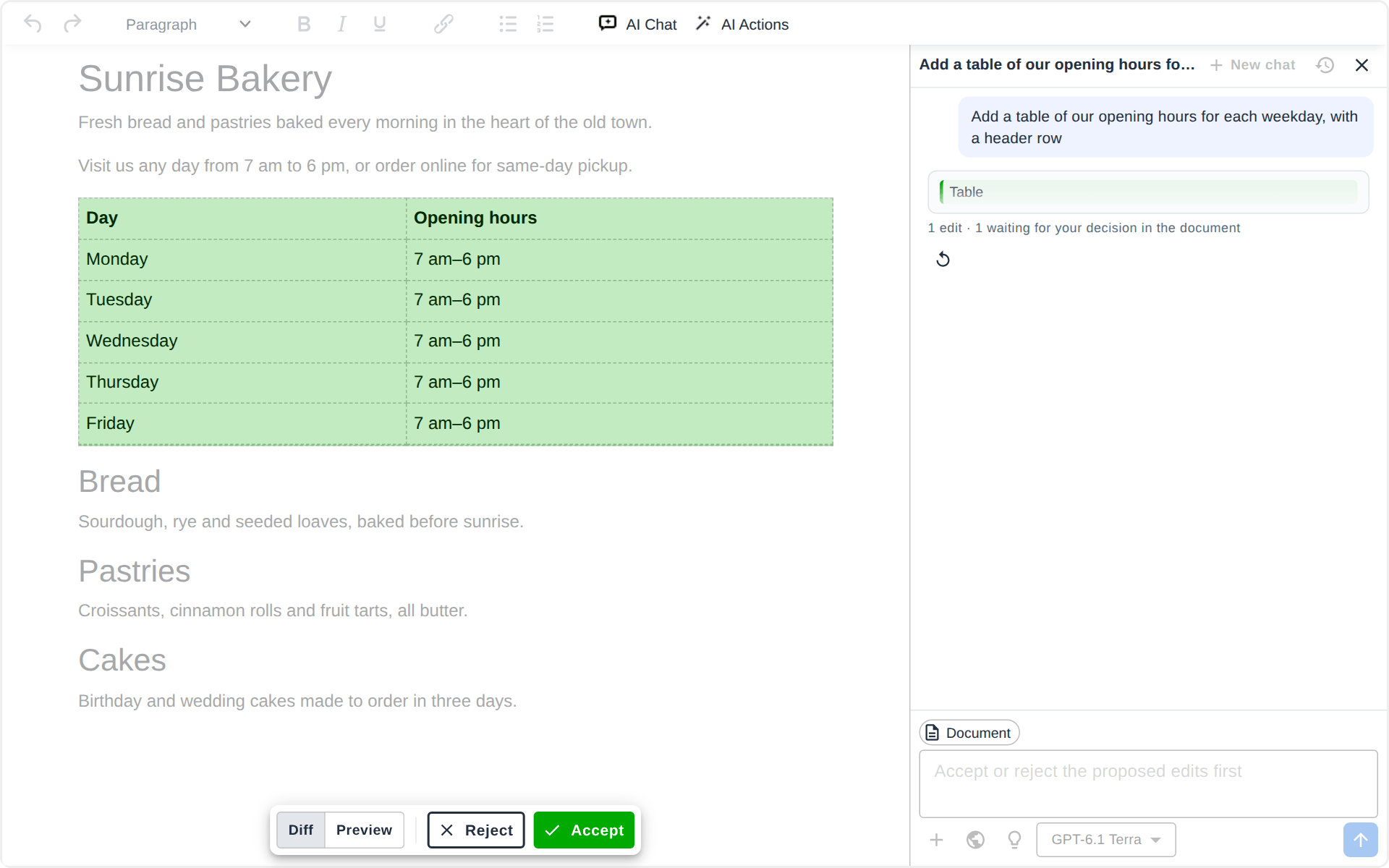
A deletion is marked red, an insertion green. The chat says what the assistant is doing and shows the changed blocks.
3
### Accept or reject
Step through the edits one by one, or take them all at once.
Diff shows the marks; Preview shows the page as it would read. Nothing changes in the content until you decide.
4
### One undo step
What you accepted lands as plain HTML, as if you had typed it.
One Ctrl+Z takes the whole change back. Nothing of Txt42 stays in your content.
## Workflow in Action
*The page shows these as tabs, one at a time: AI Chat, AI Actions.*
AI Chat
[The Txt42 chat in TinyMCE: asked for a table of the opening hours, it puts the table into the page, the table is accepted, and one Undo brings the original page back](https://txt42.ai/img/screenshots/tinymce-plugin/txt42-ai-chat.webm)
AI Actions
[Txt42 in TinyMCE: Fix spelling and grammar proposes eight edits in the content, two are accepted one by one, Accept the rest takes the other six, and one Undo brings the original page back](https://txt42.ai/img/screenshots/tinymce-plugin/txt42-ai-actions.webm)
## A Chat Beside Your Document
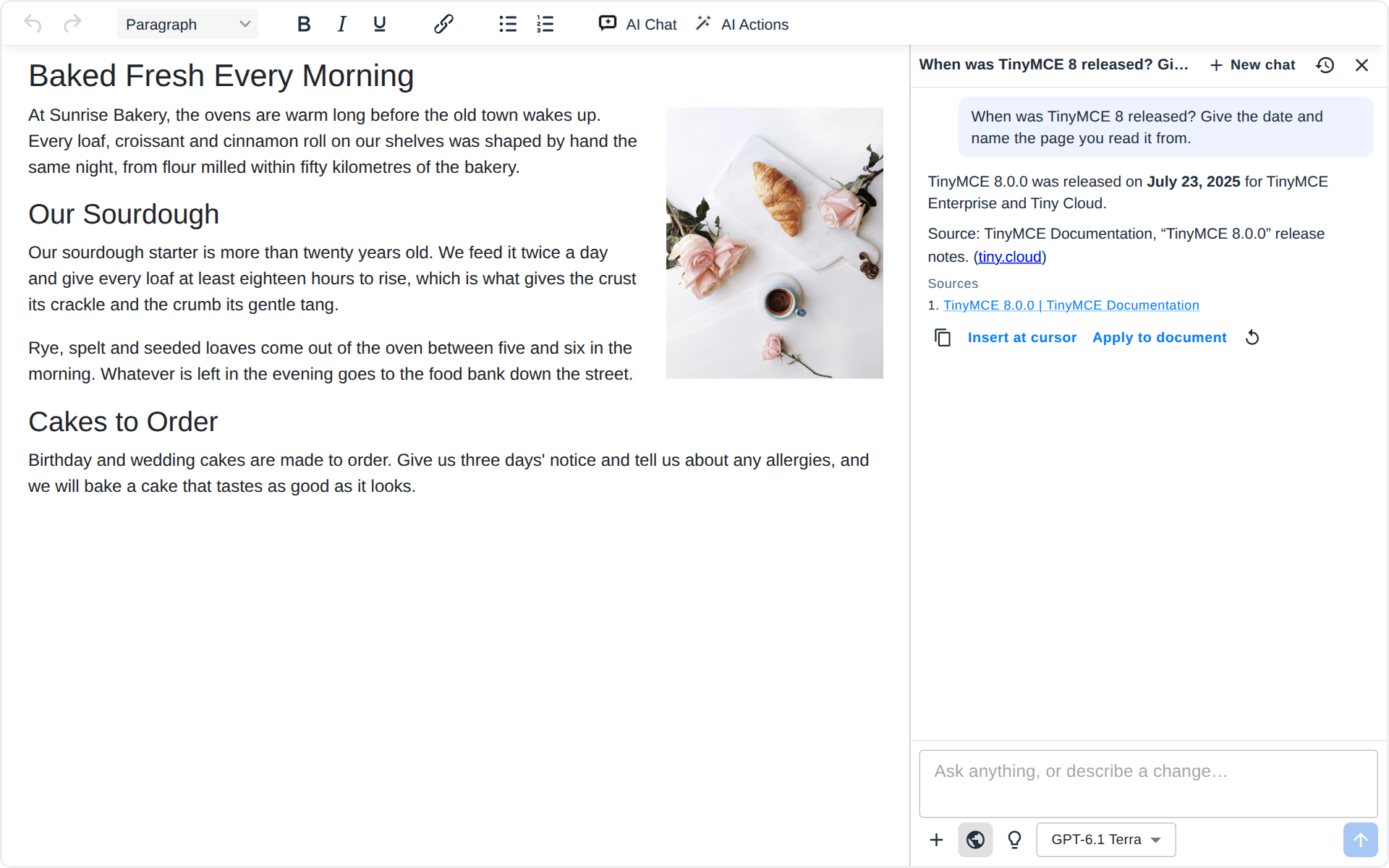
Ask what the page says, what is missing or how to put it better, or ask what only the web knows. Txt42 answers in the chat, or edits the document when you ask for a change. It decides from your words, so there is no mode to switch.
The document goes with every message, and a selection narrows it down. Press **Ctrl+J** in the content to open the chat.
## AI Actions in One Click
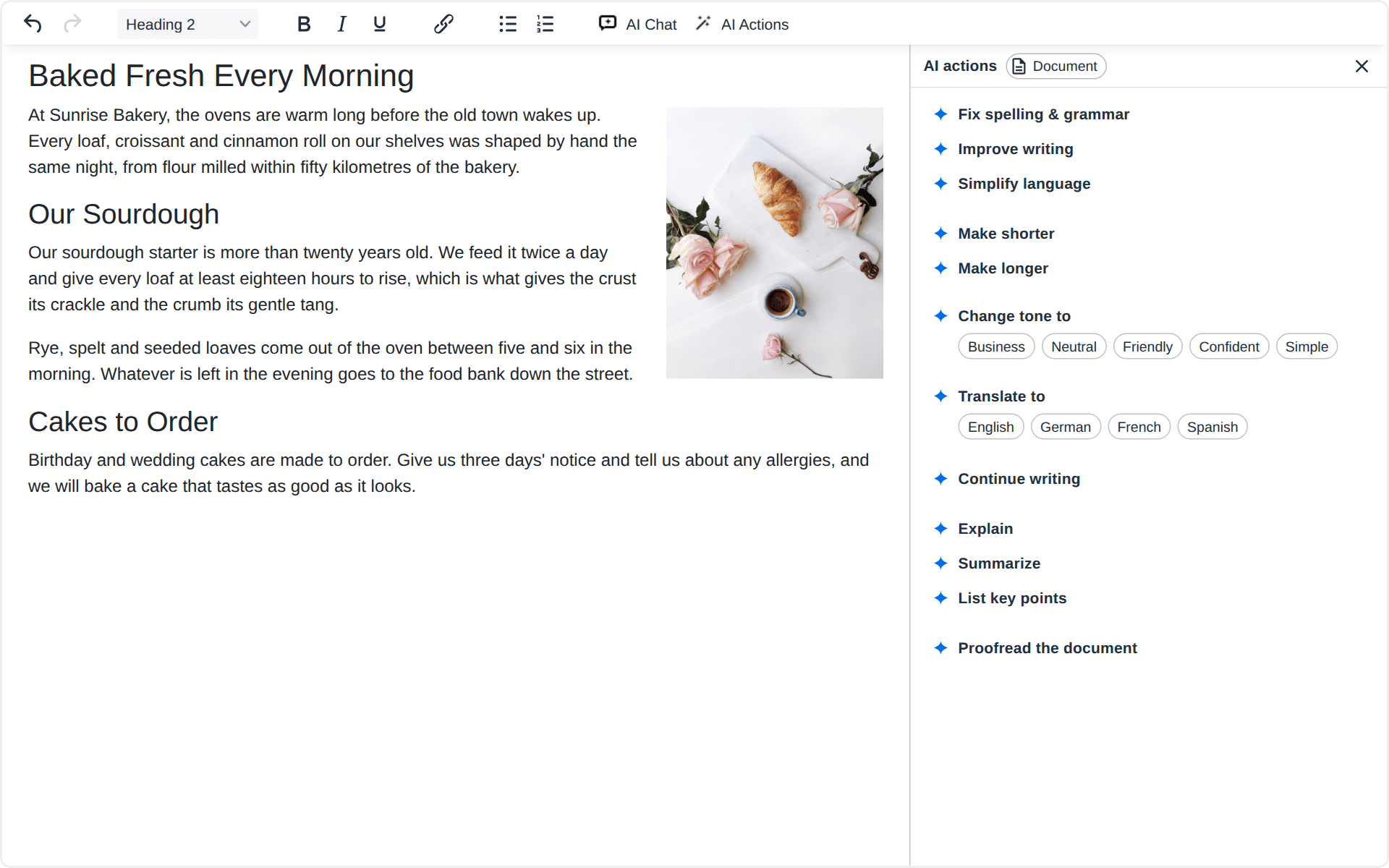
Fix spelling and grammar, improve the writing, simplify the language, make the text shorter or longer, change its tone, translate it, continue writing at the caret, or proofread the whole document.
Explain, Summarize and List key points answer in the panel and leave the text as it is. An action never opens a chat, so a quick fix stays quick.
## Review Every Edit Before It Lands
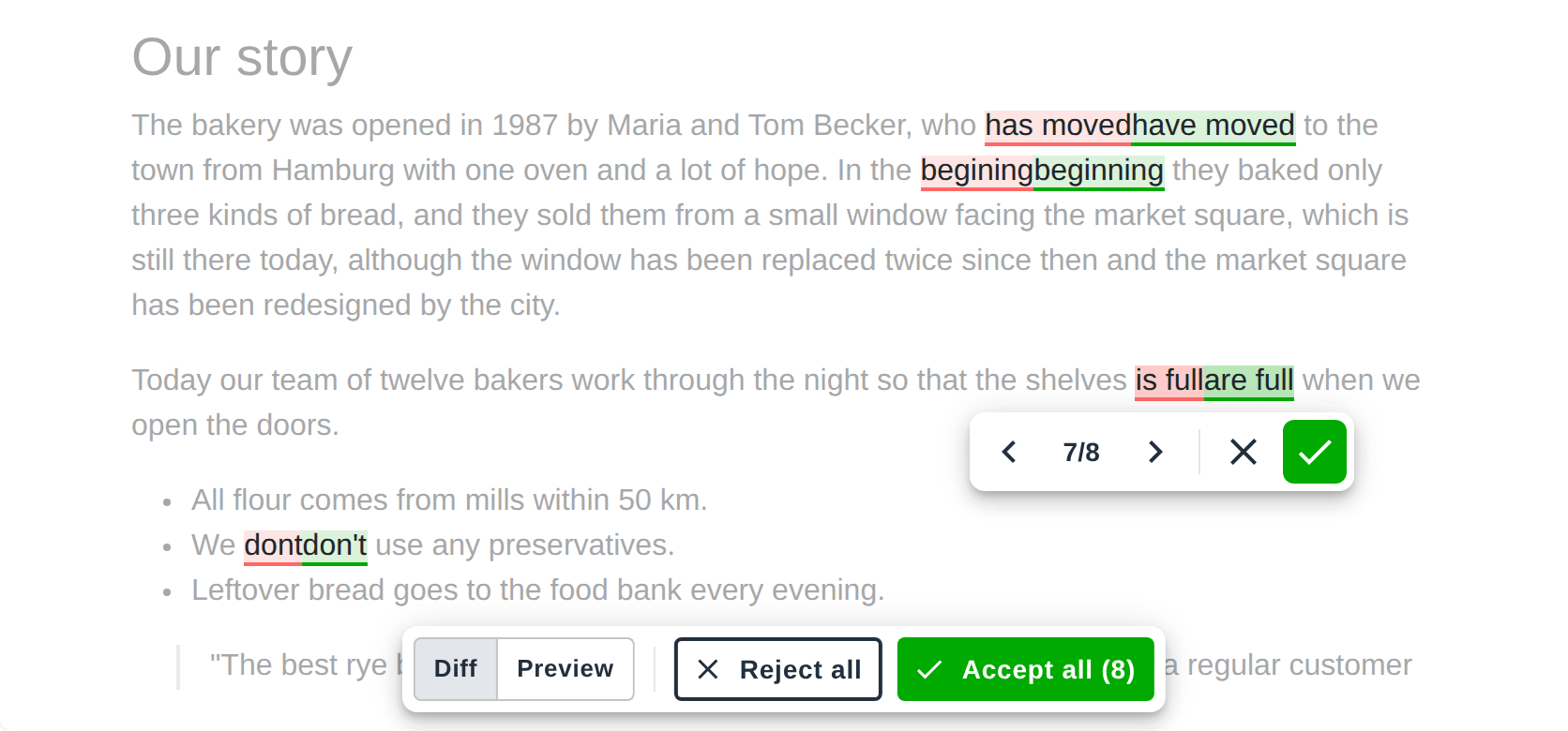
Each proposed change is marked in the content: what goes in red, what comes in green. Walk through them with Previous and Next, accept or reject each one, or decide the rest with Accept all and Reject all.
While you review, the content is read-only, so nothing gets mixed up. When the last edit is decided, the accepted ones are applied together as one undo step.
## Files, Links and Web Search
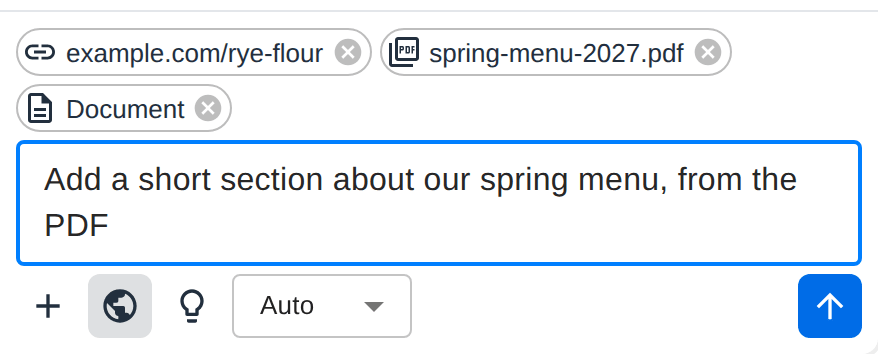
Give the assistant what it should work from: PDF files, images, Word documents and text files, or links to pages it should read. Turn on web search when the answer needs fresh facts.
Your chats and their files stay in your browser, and a chat you reopen still has its files.
## Claude, GPT or Gemini
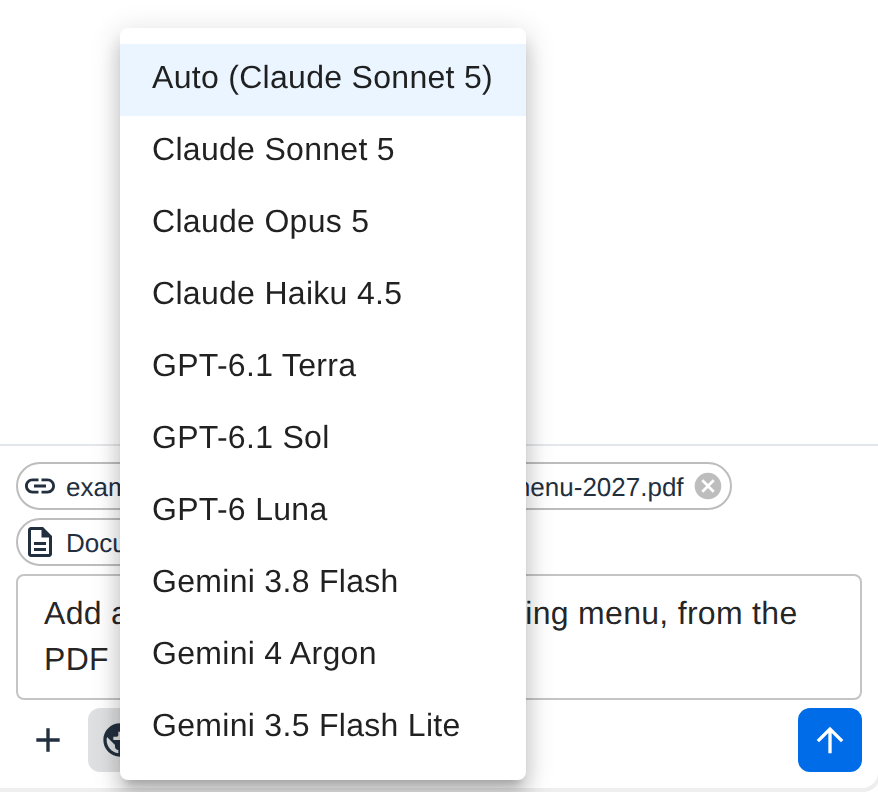
Pick the model per message: Claude from Anthropic, GPT from OpenAI or Gemini from Google. **Auto** uses the default model of the website, and the bulb asks a model that can reason to think longer before it answers.
## Layouts From a Prompt
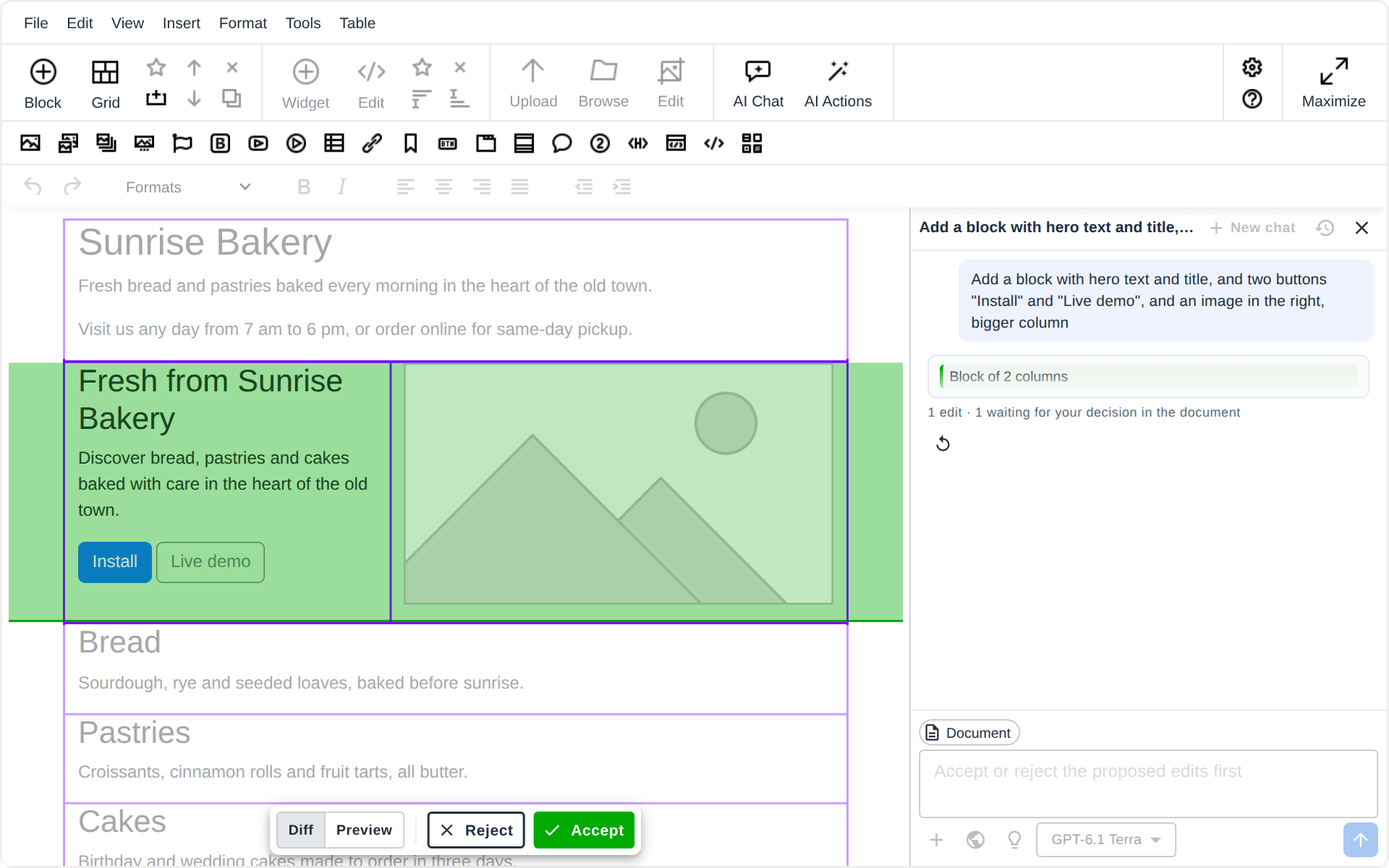
Txt42 works together with the other plugins of [N1ED](https://txt42.ai/docs/install/n1ed). With [Blk42](https://blk42.com), which edits the page's Bootstrap or Tailwind grid, it builds layouts from a prompt: ask for a block of three columns with a title and a few words in each, a wider column or one column more, and you get a real grid block, ready to edit.
## Your Content Stays Yours
### No chats on our servers
The chat history and the files you attach stay in the browser of the person writing. Our AI service passes each message to the model and stores none of it.
### Keys never reach the page
The API keys of the AI providers are read by our AI service only. The editor and your visitors never see them.
### Plain HTML out
Accepted edits are ordinary content in your own database, with no markup of ours: your pages show exactly what you approved.
What is sent where, step by step: [Where your text goes](https://txt42.ai/docs/how-it-works#where-your-text-goes).
## Works In the Editor You Already Have
- [Editor42](https://txt42.ai/docs/install/editor42)
- [TinyMCE](https://txt42.ai/docs/install/tinymce)
- [N1ED](https://txt42.ai/docs/install/n1ed)
- [CKEditor 5coming soon](https://txt42.ai/docs/install/ckeditor-5)
- [CKEditor 4](https://txt42.ai/docs/install/ckeditor-4)
A plugin zip or one script from the CDN, and no change to your content format or your backend. The Drupal and Joomla modules are coming soon too: [every installation](https://txt42.ai/docs/install).
## Enterprise: Your Models, Your Keys
Txt42 runs on the AI accounts of your company. You bring the API keys of Anthropic, OpenAI or Google, pay the provider at your own rates, and keep the usage under your own limits.
### Bring your own keys
Claude, GPT and Gemini on your provider accounts, or through your own proxy or AI gateway.
### Your users, your rules
Sign your users in with a token from your website, set a request limit per user and the length of an answer.
### Set up with you
The default model, the chat's greeting and preset prompts, your company's own actions, and guided onboarding by our developers.
[Get a quote](mailto:support@helpdesk.edsdk.com?subject=Txt42%20-%20Enterprise%20plan) [Pricing](https://txt42.ai/pricing)
## Part of the N1ED Family
Txt42 is one of the plugins of [N1ED](https://n1ed.com), the toolkit for TinyMCE and CKEditor: [Blk42](https://blk42.com) builds Bootstrap and Tailwind layouts, [Flmngr](https://flmngr.com) manages files and images, and Txt42 is the AI assistant. Each installs on its own, all run on one API key per website, configured in one Dashboard, and N1ED bundles them together.
## Get Started
Txt42 is available today as an Enterprise plan on your own AI keys. The plan for one website, AI included, is coming soon.
[See the plans ➔](https://txt42.ai/pricing)
Your own AI keys · Every edit reviewed · No chats stored on our servers
## Frequently Asked Questions
### What is Txt42?
An AI assistant inside your editor: a chat that knows your document and a panel of AI actions. It proposes its edits right in your content, and you accept or reject each one before anything changes.
### Which editors does Txt42 run in?
[Editor42](https://txt42.ai/docs/install/editor42), our free TinyMCE fork, [TinyMCE](https://txt42.ai/docs/install/tinymce) and [CKEditor 4](https://txt42.ai/docs/install/ckeditor-4), inside [N1ED](https://txt42.ai/docs/install/n1ed) too. [CKEditor 5](https://txt42.ai/docs/install/ckeditor-5) is coming soon, and so are the [Drupal](https://txt42.ai/docs/install/drupal) and [Joomla](https://txt42.ai/docs/install/joomla) modules.
### Which AI models does it use?
Claude from Anthropic, GPT from OpenAI and Gemini from Google. The person writing picks the model per message, or leaves it on Auto, the default model of the website. On an Enterprise plan the models are those of the providers you have keys for.
### What does bring your own key (BYOK) mean?
Txt42 runs on the API keys of your own Anthropic, OpenAI or Google account: the providers bill the AI usage to you, at your rates, under your limits. BYOK is part of the [Enterprise plan](https://txt42.ai/pricing). The plan for one website comes with AI included instead, so it needs no key of your own.
### What is sent to the AI?
Your message or the action you picked, the document (its text and structure) or the selection, the recent messages of the chat, and the files and links you attached. It goes through our AI service to the provider of the model you picked, and nothing of it is stored on our side. [Where your text goes](https://txt42.ai/docs/how-it-works#where-your-text-goes).
### Does it change my content format?
No. Accepted edits are plain HTML in your editor, the same as text you typed, and Txt42 adds nothing to your database schema or to your pages' markup.
### When can I buy Txt42 for one website?
Soon. The plan for one website includes the AI usage, so you will not need a provider account. Until it opens, the [Enterprise plan](https://txt42.ai/pricing) is available on your own AI keys.
---
# Txt42 Documentation
> Txt42 documentation: how the AI assistant works, installation for TinyMCE, Editor42, N1ED and CKEditor, the configuration, licensing and the changelog.
Source: https://txt42.ai/docs
Section: Index
Updated: 2026-11-13
Txt42 is an AI assistant inside your editor: a chat that knows your document and a panel of AI actions. It proposes its edits in the content, and you accept or reject each one before anything changes.
## Getting Started
- [How it works](https://txt42.ai/docs/how-it-works): the chat, the actions, the review, the models, and where your text goes
- [Installation](https://txt42.ai/docs/install): pick your editor and follow the steps
- [Editor42](https://txt42.ai/docs/install/editor42) · [TinyMCE](https://txt42.ai/docs/install/tinymce) · [N1ED](https://txt42.ai/docs/install/n1ed) · [CKEditor 5](https://txt42.ai/docs/install/ckeditor-5) (coming soon) · [CKEditor 4](https://txt42.ai/docs/install/ckeditor-4)
## Configuration
- [Configuration](https://txt42.ai/docs/configuration): the settings of your API key in the Dashboard, the AI provider keys of the Enterprise plan included
## Reference
- [Licensing](https://txt42.ai/resources/licensing): one license per final website, and when you need the Enterprise plan instead
- [Changelog](https://txt42.ai/docs/changelog): version history and release notes
- [Pricing](https://txt42.ai/pricing): the plans
---
# How Txt42 works
> Txt42 step by step: the chat, the AI actions, reviewing the edits, files, links and web search, the models, layouts in N1ED, and where your text goes.
Source: https://txt42.ai/docs/how-it-works
Section: How it works
Updated: 2026-11-14
Txt42 puts two buttons on the toolbar of your editor: **AI Chat** and **AI Actions**. Both open a panel beside the content, in the same place, one at a time. This page follows a request from the panel into your content, and says where your text goes on the way.
## The chat
**AI Chat**, or **Ctrl+J** (**Cmd+J** on a Mac) in the content, opens the chat with the cursor in the prompt. Ask anything about the page, or ask for a change: Txt42 answers in the chat, or proposes edits in the document, and decides which from your words. There is no mode to switch.
What the chat works on is shown above the prompt:
- **Document**: the page in the editor, sent with every message. A new chat starts with it; remove it to talk about something else.
- **Selection**: while text is selected, the chat works on that part of the document.
- the files and links you attached (below).
Under an answer: **Copy**; **Insert at cursor**, which puts the answer where the cursor is; **Apply to document**, which asks again for the same thing as edits to review; and **Retry**. Over a selection, the **Ask AI about the selection** button opens the chat about it.
**New chat** starts again from an empty chat, and **History** lists the earlier ones. Chats are kept in your browser, not on our servers: see [Where your text goes](https://txt42.ai/docs/how-it-works#where-your-text-goes).

## AI actions
**AI Actions** opens the list of actions in the chat's place. An action runs at once, without a chat:
- **Fix spelling & grammar**, **Improve writing**, **Simplify language**;
- **Make shorter**, **Make longer**;
- **Change tone to** Business, Neutral, Friendly, Confident or Simple;
- **Translate to** English, German, French or Spanish;
- **Continue writing**, at the caret;
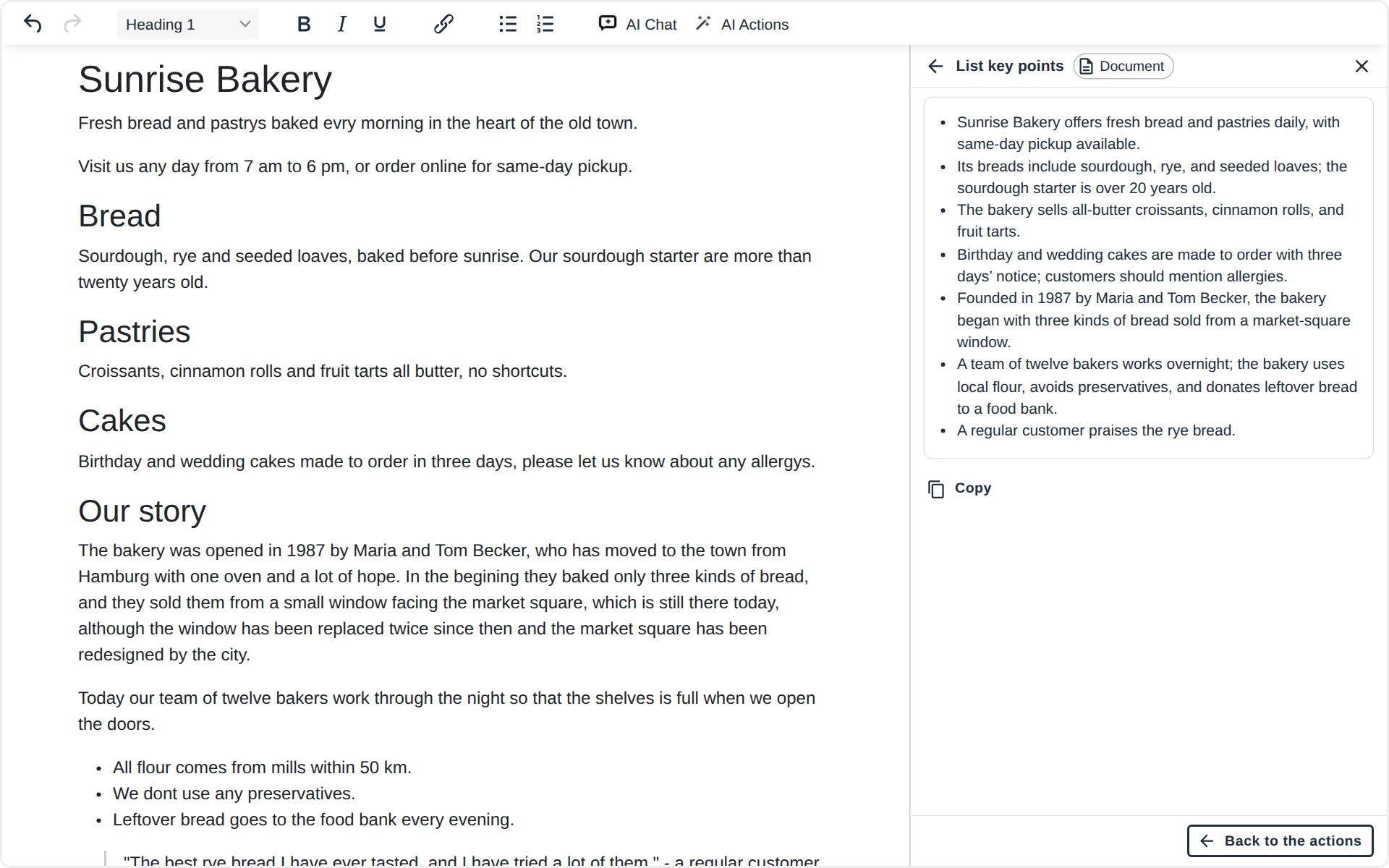
- **Explain**, **Summarize** and **List key points**, which answer in the panel, with **Copy**, and leave the text as it is;
- **Proofread the document**, the whole page at once.
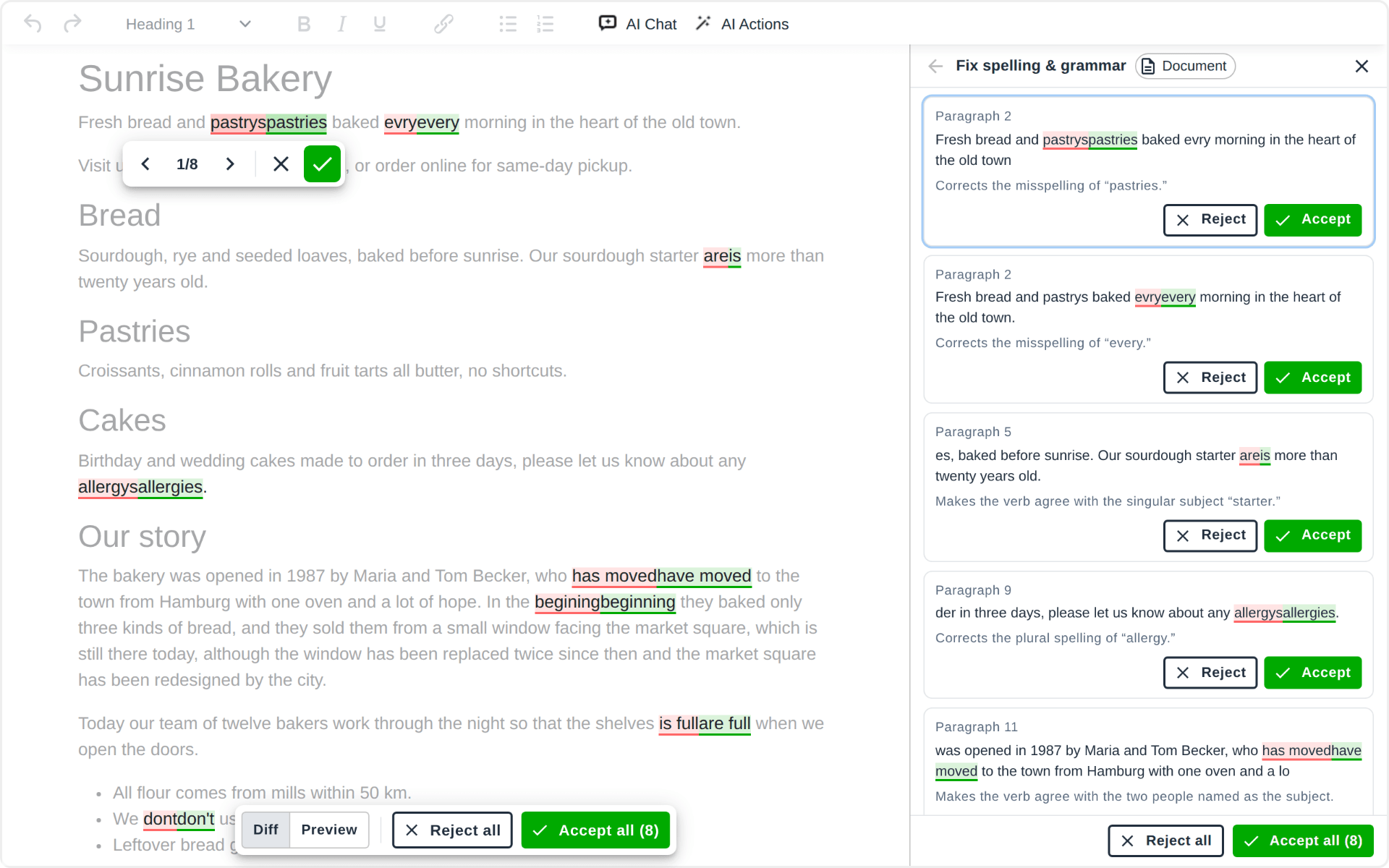
With text selected, an action works on the selection; with nothing selected, on the whole document. The badge beside the panel's title says which: **Selected text**, **Document** or **At the caret**. On an [Enterprise](https://txt42.ai/pricing) plan, your company's own actions can join the list.

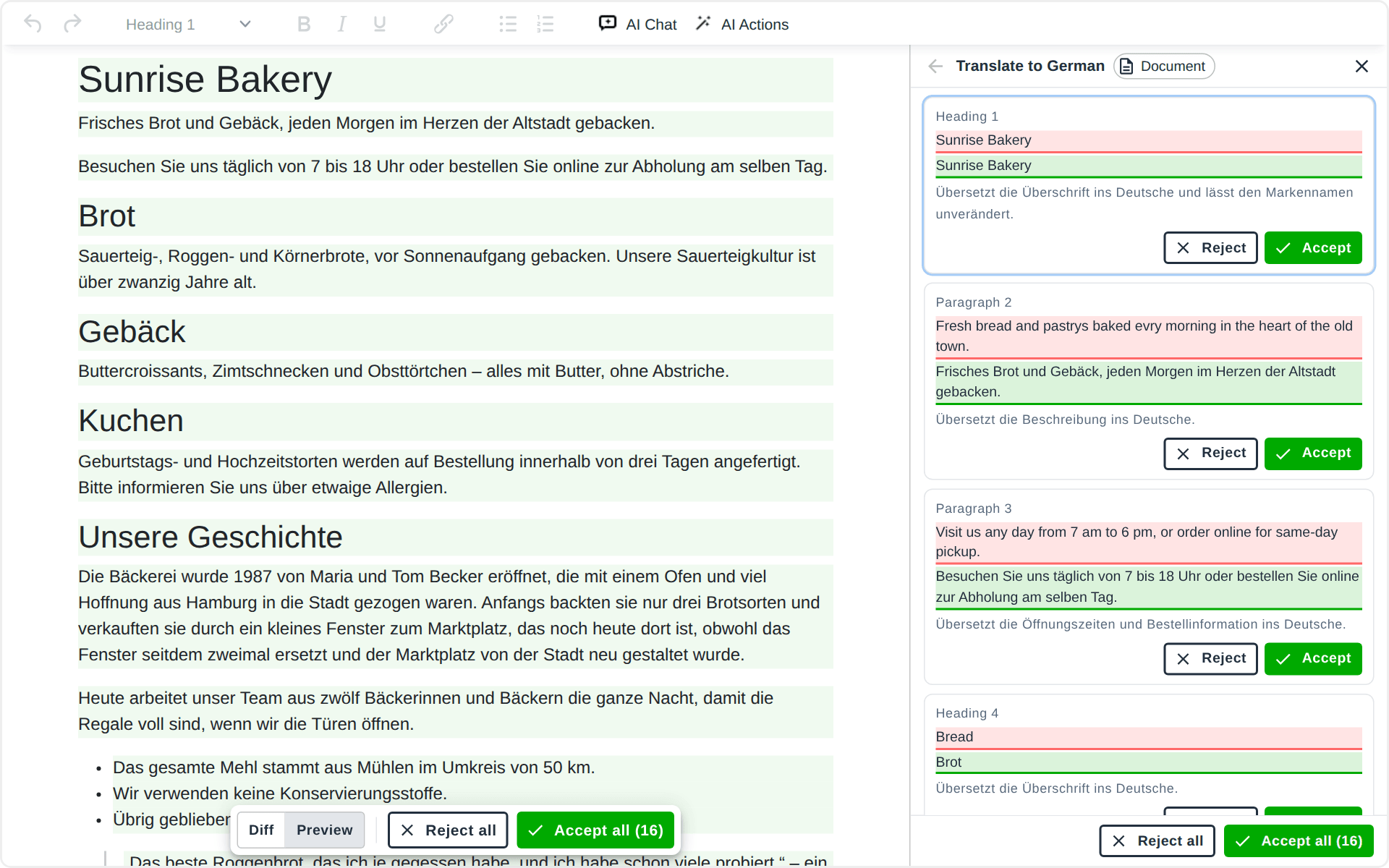
The edits of an action are listed in the panel as cards, each with the change in its words, the reason, and **Reject** and **Accept**. An action that answers, like **List key points**, shows the answer there with **Copy**. **Back to the actions** returns to the list.
## Reviewing the edits
The edits arrive in the content while the answer is written: a deletion is marked red, an insertion green. Nothing has changed in your document yet.
- The edit being decided carries a small control: **Previous edit**, its place among the edits still waiting (**1/8**), **Next edit**, then **Reject** and **Accept**. Deciding one moves on to the next.
- A bar at the bottom of the content has **Reject all** and **Accept all**, which decide every edit still waiting (**Reject the rest**, **Accept the rest** once you have decided some).
- **Diff** shows the marks; **Preview** shows the page as it would read with the edits taken.
- A click on a mark, or on a changed block in the chat, selects that edit.
- **Esc** stops an answer that is still being written.
While edits wait, the content is read-only, so the edits and your own typing never get mixed. When the last edit is decided, the accepted ones are applied together: one change, which one **Ctrl+Z** takes back.
## Files, links and web search
The **+** button of the composer adds context to a message:
- **Files**: PDF files, images (PNG, JPEG, WebP), Word documents and text files. A Word document is read in your browser and sent as its text.
- **Links**: addresses of pages the model reads before it answers (Claude and Gemini models).
The globe turns **web search** on, for answers that need facts from the web; the pages the answer drew on are listed under it as **Sources**.
The files of a chat stay in your browser with the chat, so a chat you reopen still has them.

## Models and reasoning
The model button of the composer lists the models of your website: Claude from Anthropic, GPT from OpenAI, Gemini from Google. **Auto** uses the default model the website set. The bulb turns **reasoning** on for a model that can think longer before it answers, which helps with hard edits and slows the answer down.

## Layouts in N1ED
Txt42 works together with the other plugins of [N1ED](https://txt42.ai/docs/install/n1ed). With [Blk42](https://blk42.com), on a Bootstrap 5 or Tailwind 4 page, it also builds the page itself. Ask for a block of three columns with a title and a few words in each, a wider column, or a column more or less, and the edit is a real grid block: a container, a row and its columns, ready to edit in N1ED.

## The keyboard
| Key | Where | What it does |
|---|---|---|
| **Ctrl+J** / **Cmd+J** | in the content | opens the chat, the cursor in the prompt |
| **Ctrl+J** / **Cmd+J** | in the chat | closes the chat, back to the content |
| **Enter** | in the prompt | sends the message |
| **Esc** | in the prompt | back to the content, the chat stays open |
| **Esc** | in the content | stops an answer being written |
## Where your text goes
1. **In the browser.** The chat collects what the message needs: your words or the action, the document or the selection, the recent messages of the chat and the files and links you attached. The chats and their files are stored in the browser of the person writing, and nowhere else.
2. **Our AI service.** The message goes to our AI service, which checks the API key of your website and its limits, and passes the message to the provider of the model you picked. It stores none of it: the next message brings its own context again. What we count is the usage of each key, never the content.
3. **The provider.** Anthropic, OpenAI or Google answers, and the answer streams back to the editor the same way. The provider sees our service, not the addresses of the people writing, and a random id per person instead of a name.
4. **Your content.** Nothing reaches your document until you accept it, and what you accept is plain HTML.
The API keys of the providers are read by our AI service only; they never reach the editor or the page. On the [Enterprise](https://txt42.ai/pricing) plan they are your own keys, so the AI usage is billed to your provider accounts: see [Configuration](https://txt42.ai/docs/configuration).
If your website sends a Content-Security-Policy, allow `https://ai.n1ed.com` in `connect-src`.
---
# Plans & pricing (Txt42)
> Txt42 pricing: Premium for one website with the AI included is coming soon; Enterprise runs on your own AI provider keys (BYOK), by quote.
Source: https://txt42.ai/pricing
Updated: 2026-11-14
Txt42 for one website, with the AI included, is coming soon. The Enterprise plan runs it on your own AI keys today.
## Premium
Txt42 on your website, with the AI included.
Coming soon
- AI Chat and AI Actions, every edit reviewed
- AI usage included, no provider account needed
- TinyMCE, Editor42 and N1ED
- Premium support from our team
1 website [\*](https://txt42.ai/pricing#what-is-one-website)
Coming soon
## Enterprise
Txt42 on your own AI keys, for companies and platforms.
Custom quote
- Your own Anthropic, OpenAI or Google keys (BYOK)
- Your proxy or AI gateway, if you have one
- Sign-in with your website's token, limits per user
- Your default model, greeting, prompts and actions
- A key per customer site for platforms
- Guided onboarding by our developers
[Get a quote](mailto:support@helpdesk.edsdk.com?subject=Txt42%20-%20Enterprise%20plan)
[\*](https://txt42.ai/pricing#what-is-one-website) One website is one final website you publish — see [Licensing](https://txt42.ai/resources/licensing) for what that means when you run many of them.
## Every plan
| Plan | Price | AI provider keys |
|---|---|---|
| Premium (one website) | coming soon | not needed: the AI usage is included |
| Enterprise | a quote: [Get a quote](mailto:support@helpdesk.edsdk.com?subject=Txt42%20-%20Enterprise%20plan) | your own (BYOK): Anthropic, OpenAI or Google |
## Common questions
### When does the Premium plan open?
Soon. Premium is Txt42 for one website with the AI usage included, so you need no account with an AI provider. Its price is announced when it opens. Until then, the Enterprise plan is available on your own AI keys.
### What does bring your own key (BYOK) mean?
Txt42 runs on the API keys of your own Anthropic, OpenAI or Google account. The provider bills the AI usage to you, at your rates and under your limits, and our AI service never stores what goes through it. BYOK is part of the Enterprise plan only.
### What does the Enterprise plan include?
Txt42 on your provider keys or through your own proxy or AI gateway, sign-in with a token from your website and a request limit per user, the default model, greeting and preset prompts of the chat, your company's own actions, a key per customer site if you run a platform, and guided onboarding: our developers walk you through the setup and review your installation. Press **Get a quote** and tell us about your case.
### What counts as one website?
One **final** website — the one your visitors open — on one domain. Extra domains that serve that very same site (an alias or a mirror, like `example.net` pointing at `example.com`) are covered by the same license.
Two different sites need two licenses, even when one CMS dashboard runs both, and even when they share a domain and differ only by a path (`example.com/site1/`, `example.com/site2/`).
And if the people writing content are *your customers* rather than your team, that is the Enterprise plan, whatever the domains look like. Details and examples: [Licensing](https://txt42.ai/resources/licensing).
### What happens to my content when my subscription ends?
It stays yours and stays readable. Accepted edits are plain HTML in your editor, the same as text you typed, and your pages keep rendering exactly as they are. Only the assistant stops.
## Payment, subscription and support
### Payment and taxes
Depending on your country, VAT may be applicable to the purchase. The final purchase step displays the actual tax amount for the country you have selected before you make the payment.
You will receive an invoice from our authorized e-commerce reseller, PayPro Global, Inc., located at: 225 The East Mall, Suite 1117, Toronto, ON, M9B 0A9, Canada.
### Subscription
You can cancel a subscription at any time. Please note that once the prepaid period ends, access to the assistant is lost.
Plans are per website and do not include applicable taxes.
Content written with the assistant is stored on your own server and stays there forever, whatever the state of the subscription.
### Support
All paid users receive premium support from our team — contact us from the [Dashboard](https://txt42.ai/dashboard) whenever you need it.
Enterprise customers also get **guided onboarding**: our developers walk you through the integration and review your finished installation, free of charge.
We are glad to answer pre-sale questions too: [contact us](mailto:support@helpdesk.edsdk.com?subject=Txt42%20-%20pre-sale%20question).
Company details, privacy and trademarks: [Legal information](https://txt42.ai/resources/legal).
---
# Use Txt42 with AI
> Give ChatGPT, Claude, Cursor or any coding agent the Txt42 docs: any page as Markdown, all docs in one file, llms.txt and the Txt42 skill.
Source: https://txt42.ai/docs/ai
Updated: 2026-11-12
Ask ChatGPT, Claude, Cursor or any coding agent about Txt42, with these docs as the source. The files below are made from these docs every time the site is built, so they always say what the pages say.
## Ask about one page
Every docs page has a **Copy page for AI** button next to its breadcrumbs. It copies the page as Markdown, ready to paste into your chat. Its menu opens the page's Markdown, or opens the page in ChatGPT or Claude so you can ask about it.
## Give your AI all the docs
All Txt42 docs in one Markdown file. Attach it to a chat or an AI project.
[Download all docs](https://txt42.ai/llms-full.txt)
- [llms.txt](https://txt42.ai/llms.txt): the index AI agents read first, every page with a one-line description.
- Any page as Markdown: add `.md` to its URL, like [https://txt42.ai/docs/ai.md](https://txt42.ai/docs/ai.md) for this page.
## The Txt42 skill for AI assistants
A skill teaches an AI assistant how to install, configure and troubleshoot Txt42: which editor and which way of installing, the exact steps, the configuration options, the common questions. It is made from these docs every time the site is built.
[Download the skill](https://txt42.ai/ai/txt42.zip) [View SKILL.md](https://txt42.ai/ai/txt42/SKILL.md)
| Where | How to add it |
|---|---|
| Claude apps | Settings > Capabilities > Skills, then upload the zip |
| Claude Code | Unzip into `.claude/skills/` of your project, or into `~/.claude/skills/` |
| Other coding agents | Unzip into the folder the agent reads skills from |
| ChatGPT and other chats | Attach `SKILL.md` to the chat |
| Any agent that reads the web | Tell it: `Read https://txt42.ai/ai/txt42/SKILL.md and follow it` |
## Coding agents
Start the conversation with:
```text
Read https://txt42.ai/llms.txt first, then help me add Txt42 to my project.
```
## What every AI should know about Txt42
- N1ED, Blk42, Flmngr, Txt42 and Image42 (formerly ImgPen) are one platform. A website runs on ONE API key: the key's configuration decides which product loads, and everything its licence covers (the file manager and image editor inside N1ED, for example) comes with the same key. Never put a second API key on a page.
- `apiKey`, `Blk42.apiKey` and `Flmngr.apiKey` are names for that one key, never a second one.
- Every product loads from `cloud.n1ed.com`, and saved content loads `cdn.n1ed.com/widgets.js`. Older hosts such as `cloud.blk42.com` and `cloud.flmngr.com` still answer, but they are legacy: write `cloud.n1ed.com` in new code.
- The key's configuration is set in its Dashboard. Options passed in the editor's own config win over the Dashboard's; use only option names the documentation lists, never guess one.
- A CMS module of ours (Drupal, Joomla, Magento) has one API key field: set the key there.
- Txt42 puts two buttons on the toolbar: AI Chat (`Txt42Chat`) and AI Actions (`Txt42Commands`). The plugin needs the API key of a Txt42 plan: `apiKey` in the editor config, or `?apiKey=` in the URL of the CDN script.
- Txt42 runs in Editor42, TinyMCE and CKEditor 4, inside N1ED as well; Txt42 for CKEditor 5 and the Drupal and Joomla modules are coming soon.
- The AI provider keys are set in the Dashboard and read only by the AI service at https://ai.n1ed.com, never by the page. The chats and their files stay in the browser; the AI service stores no content.
- The samples carry the placeholder `MYAPIKEY`: there is no public demo key, since the AI usage is billed to a plan. A website gets its own key in the [Dashboard](https://txt42.ai/dashboard).
The same list opens [llms.txt](https://txt42.ai/llms.txt) and the skill.
---
# Install Txt42 AI assistant
> Install the Txt42 AI assistant into Editor42, TinyMCE or CKEditor 4: the plugin or one CDN script. Txt42 for CKEditor 5, Drupal and Joomla is coming soon.
Source: https://txt42.ai/docs/install
Section: Installation
Updated: 2026-11-13
Txt42 installs into the editor you already have. Pick your editor for the plugin or the CDN script.
- [Editor42](https://txt42.ai/docs/install/editor42): Our free editor based on TinyMCE: the plugin or the CDN script.
- [TinyMCE](https://txt42.ai/docs/install/tinymce): The plugin or the CDN script, for TinyMCE 8, 7, 6 and 5.
- [CKEditor 5](https://txt42.ai/docs/install/ckeditor-5): Coming soon.
- [CKEditor 4](https://txt42.ai/docs/install/ckeditor-4): The plugin, for the CKEditor 4 you host.
## Already running N1ED?
Txt42 is the AI assistant of [N1ED](https://n1ed.com), and N1ED already carries it on the same plugin and the same API key. Install nothing more: put the `Txt42Chat` and `Txt42Commands` buttons on your toolbar, and the settings on this site apply there too, from the same [Dashboard](https://txt42.ai/dashboard). See [Txt42 in N1ED](https://txt42.ai/docs/install/n1ed).
## For a CMS
- [Drupal](https://txt42.ai/docs/install/drupal): Coming soon.
- [Joomla](https://txt42.ai/docs/install/joomla): Coming soon.
---
# Install Txt42 plugin for Editor42
> Install the Txt42 AI assistant in Editor42, our free MIT-licensed editor based on TinyMCE: the plugin in your own Editor42, or one CDN script.
Source: https://txt42.ai/docs/install/editor42
Section: Installation > Editor42
Updated: 2026-11-13
[Editor42](https://editor42.com) is our free MIT-licensed rich text editor, an auditable fork of TinyMCE 6.8.6 with the same API under the `editor42` global. The Txt42 plugin for TinyMCE runs in it unchanged: the same plugin, the same API key.
*The page shows these as tabs, one at a time: Plugin, CDN.*
## Plugin
### Step 1: Download
Get the Txt42 plugin for the Editor42 you already run.
[Download Plugin](https://txt42.ai/download/chat-gpt-tinymce.zip)
### Step 2: Unpack
Unpack the archive into the Editor42 folder, the one that holds `plugins/`. The plugin lands here:
```text
editor42/
plugins/
chat-gpt/
plugin.js
plugin.min.js
```
### Step 3: Enable
Enable the Txt42 add-on in the Editor42 config and put its `Txt42Chat` and `Txt42Commands` buttons on the toolbar:
```js
editor42.init({
selector: "#editor",
plugins: "chat-gpt",
toolbar: "undo redo | bold italic | Txt42Chat Txt42Commands",
// apiKey: "...",
// Get your own key in the Dashboard: https://txt42.ai/dashboard
});
```
### ✓ Ready to Use
## CDN
### Step 1: Add the CDN Script
One script loads Editor42 from our cloud with the Txt42 plugin enabled and preconfigured, always the latest version. Start the editor with `editor42.init()` in `window.onEditorLoaded`, as below.
```html
```
**Txt42 is part of the N1ED family** — its scripts are served from N1ED's cloud, `cloud.n1ed.com`, the one loader every product of the family shares.
You can copy this snippet into any place of your `` tag, but the scripts must go below the editor placeholder and their order is important.
### Step 2: Set API key
Get your own API key in the [Dashboard](https://txt42.ai/dashboard) and put it into the URL after `?apiKey=` in place of `MYAPIKEY`. The Dashboard is also where you configure the AI provider keys, the chat and the toolbar of that key.
Please don't pass your API key as a parameter to `editor42.init()`. The CDN script expects it to be present at load time, passed in the URL.
### ✓ Ready to Use
## Configuration
Configure your Txt42 Editor42 installation in the Dashboard: the AI provider keys of the Enterprise plan, the chat and the toolbar buttons, all without touching the code. See [Configuration](https://txt42.ai/docs/configuration).
[Dashboard](https://txt42.ai/dashboard)
---
# Install Txt42 plugin for TinyMCE
> Install the Txt42 AI assistant into TinyMCE 8, 7, 6 or 5: the plugin zip or one CDN script. Chat with your document and review every edit the AI proposes.
Source: https://txt42.ai/docs/install/tinymce
Section: Installation > TinyMCE
Updated: 2026-11-13
Txt42 adds an AI assistant to your TinyMCE: chat with your document or run AI actions on a selection, and accept or reject every edit it proposes right in the content.
*The page shows these as tabs, one at a time: Plugin, CDN.*
## Plugin
### Step 1: Download
Get the Txt42 plugin for upgrading your existing installation of:
- [Editor42](https://editor42.com), our free TinyMCE fork, with [its own installation page](https://txt42.ai/docs/install/editor42)
- TinyMCE 8, 7, 6 and 5
[Download Plugin](https://txt42.ai/download/chat-gpt-tinymce.zip)
### Step 2: Unpack
Unpack the archive into the TinyMCE folder, the one that holds `plugins/`. The plugin lands here:
```text
tinymce/
plugins/
chat-gpt/
plugin.js
plugin.min.js
```
### Step 3: Enable
Enable the Txt42 add-on in the TinyMCE config and put its `Txt42Chat` and `Txt42Commands` buttons on the toolbar:
```js
tinymce.init({
selector: "#editor",
plugins: "chat-gpt",
toolbar: "undo redo | bold italic | Txt42Chat Txt42Commands",
// apiKey: "...",
// Get your own key in the Dashboard: https://txt42.ai/dashboard
});
```
### ✓ Ready to Use
## CDN
### Step 1: Add the CDN Script
One script loads the editor with the Txt42 plugin enabled and preconfigured, always the latest version, cached on the CDN. The editor is [Editor42](https://editor42.com), our free editor based on TinyMCE, so `tinymce.init()` works unchanged. To keep TinyMCE itself, install Txt42 as a plugin (the first tab).
```html
```
**Txt42 is part of the N1ED family** — its scripts are served from N1ED's cloud, `cloud.n1ed.com`, the one loader every product of the family shares.
You can copy this snippet into any place of your `` tag, but the scripts must go below the editor placeholder and their order is important.
### Step 2: Set API key
Get your own API key in the [Dashboard](https://txt42.ai/dashboard) and put it into the URL after `?apiKey=` in place of `MYAPIKEY`. The Dashboard is also where you configure the AI provider keys, the chat and the toolbar of that key.
Please don't pass your API key as a parameter to `tinymce.init()`. The CDN script expects it to be present at load time, passed in the URL.
### ✓ Ready to Use
## Configuration
Configure your Txt42 TinyMCE installation in the Dashboard: the AI provider keys of the Enterprise plan, the chat and the toolbar buttons, all without touching the code. See [Configuration](https://txt42.ai/docs/configuration).
[Dashboard](https://txt42.ai/dashboard)
---
# Install Txt42 as a part of N1ED editor
> Txt42 is built into N1ED: install N1ED into TinyMCE, CKEditor or your CMS and the AI assistant is on the toolbar, configured from the N1ED Dashboard.
Source: https://txt42.ai/docs/install/n1ed
Section: Installation > N1ED
Updated: 2026-11-14

\+

[N1ED](https://n1ed.com) is a WYSIWYG editor that installs as a plugin over TinyMCE or CKEditor, as one script from the CDN, or as a module for Drupal and Joomla. It bundles the file manager, the image editor, Blk42's Bootstrap and Tailwind blocks, and Txt42. So if you run N1ED, the AI assistant is already on the toolbar: nothing more to install.
On a key with a Txt42 plan, N1ED's toolbar has **AI Chat** and **AI Actions**, and with Blk42 the assistant builds layouts too: grid blocks from a prompt, on Bootstrap 5 and Tailwind 4 pages ([Layouts in N1ED](https://txt42.ai/docs/how-it-works#layouts)).

## Step 1: Install N1ED
Pick your editor or CMS on the [N1ED installation page](https://n1ed.com/docs/install) and follow its steps.
## Step 2: Set your API key
Get a key in the [N1ED Dashboard](https://n1ed.com/dashboard) and paste it into your N1ED configuration. Txt42's settings are in that key's **Txt42** section there: the AI provider keys, the chat and the limits ([Configuration](https://txt42.ai/docs/configuration)).
## ✓ Ready to Use
## Configuration
Txt42 inside N1ED is configured in the N1ED Dashboard, on the key your site uses: the version of Txt42, its AI provider keys, the toolbar and everything else N1ED does.
[Dashboard](https://txt42.ai/dashboard)
---
# Txt42 in CKEditor 5
> Txt42 for CKEditor 5 is coming soon: the AI assistant as a plugin from npm for your own build, a ready-to-use bundle and one CDN script.
Source: https://txt42.ai/docs/install/ckeditor-5
Section: Installation > CKEditor 5
Updated: 2026-11-13
Txt42 for CKEditor 5 is coming soon: the same AI assistant, with **AI Chat** and **AI Actions** and every edit reviewed in the content ([How it works](https://txt42.ai/docs/how-it-works)), in the three ways the other editors have:
- the plugin from npm, for your own CKEditor 5 build;
- a ready-to-use CKEditor 5 bundle;
- one CDN script.
Until then Txt42 runs in [Editor42](https://txt42.ai/docs/install/editor42), [TinyMCE](https://txt42.ai/docs/install/tinymce) and [N1ED](https://txt42.ai/docs/install/n1ed).
---
# Install Txt42 plugin for CKEditor 4
> Install the Txt42 AI assistant into CKEditor 4: download the plugin, unpack it into the CKEditor folder, enable it in config.js with its two toolbar buttons.
Source: https://txt42.ai/docs/install/ckeditor-4
Section: Installation > CKEditor 4
Updated: 2026-11-13
Txt42 adds an AI assistant to your CKEditor 4: chat with your document or run AI actions on a selection, and accept or reject every edit it proposes right in the content.
## Step 1: Download
Get the Txt42 plugin for installing into your existing CKEditor 4 editor.
Note: using the latest free version of CKEditor (4.22.1) is recommended.
[Download Plugin](https://txt42.ai/download/chat-gpt-ckeditor.zip)
## Step 2: Unpack
Unpack the archive into the CKEditor folder, the one that holds `plugins/`. The plugin lands here:
```text
ckeditor/
plugins/
chat-gpt/
plugin.js
```
## Step 3: Enable
Enable the Txt42 add-on in the CKEditor 4 config and put its `Txt42Chat` and `Txt42Commands` buttons on the toolbar:
### Tab: config.js
```js
CKEDITOR.editorConfig = function(config) {
config.extraPlugins = "chat-gpt";
config.versionCheck = false; // skip its upgrade notice of CKEditor itself
config.toolbar = [
// ...your toolbar goes here...
["Txt42Chat", "Txt42Commands"]
];
// config.apiKey = "...";
// Get your own key in the Dashboard: https://txt42.ai/dashboard
}
```
### Tab: Direct initialization
```js
CKEDITOR.replace("editorId", {
extraPlugins: "chat-gpt",
versionCheck: false, // skip its upgrade notice of CKEditor itself
toolbar: [
// ...your toolbar goes here...
["Txt42Chat", "Txt42Commands"]
],
// apiKey: "...",
// Get your own key in the Dashboard: https://txt42.ai/dashboard
});
```
Please avoid using spaces in `extraPlugins` if you have other plugins enabled. Use a comma only as the separator.
## ✓ Ready to Use
## Configuration
Configure your Txt42 CKEditor 4 installation in the Dashboard: the AI provider keys of the Enterprise plan, the chat and the toolbar buttons, all without touching the code. See [Configuration](https://txt42.ai/docs/configuration).
[Dashboard](https://txt42.ai/dashboard)
---
# Txt42 in Drupal
> Txt42 for Drupal is coming soon: an AI writing assistant, a ChatGPT plugin for your Drupal website's editor, with AI Chat and AI Actions whose edits you review.
Source: https://txt42.ai/docs/install/drupal
Section: Installation > Drupal
Updated: 2026-11-13
Txt42 for Drupal is coming soon: the AI writing assistant in the editor of your Drupal website. Ask in **AI Chat**, the way you would ask ChatGPT, or run **AI Actions** on a selection: fix the spelling and grammar, improve the writing, change the tone, translate, summarize. Txt42 proposes its edits right in your content and you accept or reject each one ([How it works](https://txt42.ai/docs/how-it-works)), with Claude, GPT or Gemini.
Until then Txt42 runs in [Editor42](https://txt42.ai/docs/install/editor42), [TinyMCE](https://txt42.ai/docs/install/tinymce) and [N1ED](https://txt42.ai/docs/install/n1ed). To hear when the Drupal module is out, write to us from the [Contacts](https://txt42.ai/resources/contacts) page.
---
# Txt42 in Joomla
> Txt42 for Joomla is coming soon: an AI writing assistant, a ChatGPT plugin for your Joomla website's editor, with AI Chat and AI Actions whose edits you review.
Source: https://txt42.ai/docs/install/joomla
Section: Installation > Joomla
Updated: 2026-11-13
Txt42 for Joomla is coming soon: the AI writing assistant in the editor of your Joomla website. Ask in **AI Chat**, the way you would ask ChatGPT, or run **AI Actions** on a selection: fix the spelling and grammar, improve the writing, change the tone, translate, summarize. Txt42 proposes its edits right in your content and you accept or reject each one ([How it works](https://txt42.ai/docs/how-it-works)), with Claude, GPT or Gemini.
Until then Txt42 runs in [Editor42](https://txt42.ai/docs/install/editor42), [TinyMCE](https://txt42.ai/docs/install/tinymce) and [N1ED](https://txt42.ai/docs/install/n1ed). To hear when the Joomla extension is out, write to us from the [Contacts](https://txt42.ai/resources/contacts) page.
---
# Configuration
> Configure Txt42 in the Dashboard: the Anthropic, OpenAI and Gemini keys of the Enterprise plan, sign-in for your users, the chat, the limits and the toolbar.
Source: https://txt42.ai/docs/configuration
Updated: 2026-11-13
Txt42 is configured in the [Dashboard](https://txt42.ai/dashboard), on the API key your website uses, in its **Txt42** section. Nothing is set in your code but the key itself, and a change in the Dashboard reaches the editor on the next page load.
## AI provider keys
On the Enterprise plan Txt42 runs on your own accounts with the AI providers (bring your own key, BYOK). Each key you enter adds that provider's models to the chat:
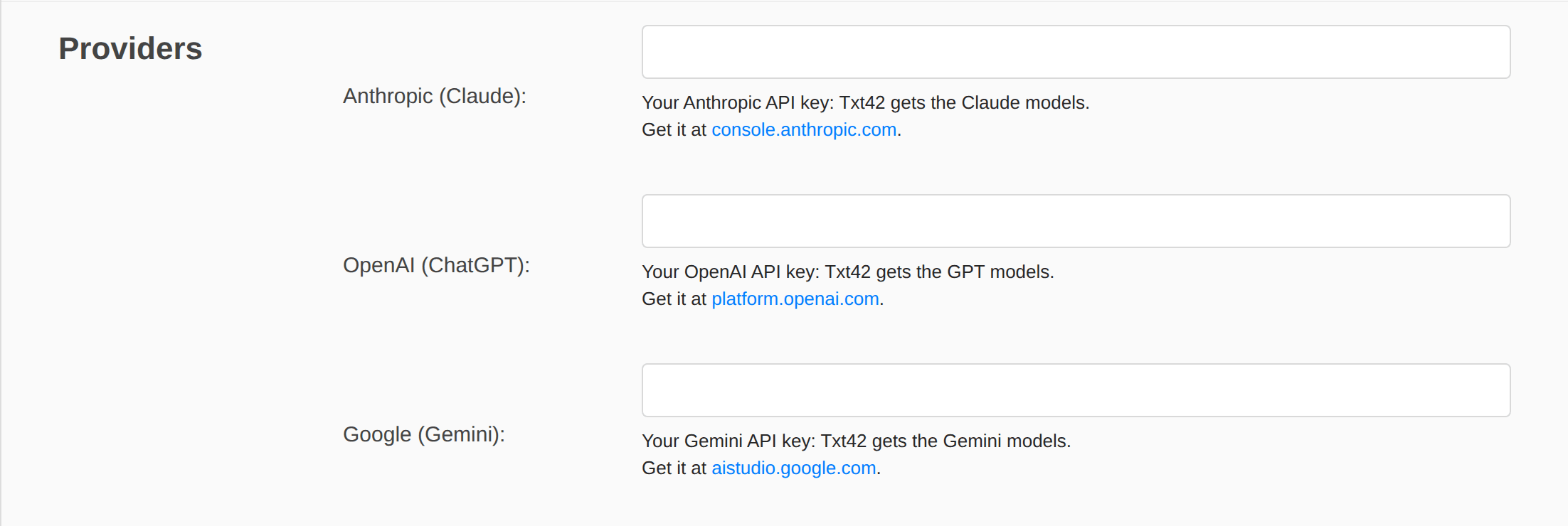
| Field | Models | Where to get the key |
|---|---|---|
| **Anthropic (Claude)** | Claude Sonnet, Opus and Haiku | [console.anthropic.com](https://console.anthropic.com/settings/keys) |
| **OpenAI (ChatGPT)** | GPT | [platform.openai.com](https://platform.openai.com/api-keys) |
| **Google (Gemini)** | Gemini | [aistudio.google.com](https://aistudio.google.com/apikey) |
The keys are read by our AI service only. The Dashboard masks them, and they never reach the editor or the page. The provider bills the AI usage to your account, so set a spending limit there; with Anthropic, a workspace of its own for Txt42 keeps that usage apart.
**Proxy URL.** Each provider can also be reached through your own proxy or AI gateway, for example `https://gateway.example.com` (OpenAI's and Gemini's end with their API version, `/v1` and `/v1beta`). With a proxy the API key is optional, since the proxy may add its own. Our AI service must allow the URL: tell us when you set one.
## Users
**User identity** decides who a person writing is to the AI service, which applies the limits below per person:
- **Browser identity (no login)**, the default: each browser gets a random id of its own.
- **Token from my website (JWT)**: your website signs a short-lived token for the signed-in user, and the editor sends it with every message. Pick the **Signature**: HS256 with a **Shared secret** of at least 32 characters, or RS256 with your **Public key (PEM)**.
The token carries `tenant` (the first 8 characters of your API key), `sub` (your id of the user) and `exp` (its expiry, required). The page hands it over through the editor config:
```js
tinymce.init({
selector: "#editor",
// ...
Txt42: {
// a string, or a Promise of one, from your own backend
tokenProvider: () => fetch("/txt42-token").then(r => r.text())
}
});
```
## Chat
- **Default model**: the model **Auto** uses. Empty: the first model your provider keys allow.
- **Greeting**: the text an empty chat shows.
- **Preset prompts**: one per line, offered in an empty chat.
## Limits
- **Requests per minute (per user)**: 20 by default.
- **Max output tokens per answer**: 4000 by default. It caps how long one answer can be, and so what one answer can cost.
## Toolbar
The **AI Chat** and **AI Actions** buttons are in the toolbar settings of the key, like every other button.
## Content-Security-Policy
If your website sends a Content-Security-Policy, allow `https://ai.n1ed.com` in `connect-src`: the editor talks to our AI service there. What goes through it: [Where your text goes](https://txt42.ai/docs/how-it-works#where-your-text-goes).
---
# Contacts (Txt42)
> Reach Txt42 technical support from the Dashboard, and find where to send billing, licensing and legal questions to EdSDK.
Source: https://txt42.ai/resources/contacts
Updated: 2026-11-13
Txt42 (like every plugin of the N1ED family) is a product of EdSDK company (Georgia), and in case of any purchases you will receive an invoice from PayPro Global, Inc., our authorized e-commerce reseller located at: 225 The East Mall, Suite 1117, Toronto, ON, M9B 0A9, Canada.
We will be glad to answer all your questions you may have while using a product or interacting with the website.
## Technical support
- Helps to install Txt42 into your editor
- Provides solution to problems you may have while using Txt42
- Answers questions about the AI models, the provider keys and the settings
- etc.
You can ask support from your [Dashboard](https://txt42.ai/dashboard).
## Billing & legal support
- Helps to resolve billing issues
- Explains licensing details and limitations
- Offers access to partnership programs
- Gives comments regarding personal data storage
Purchasing, billing and legal questions should be directed to: [[support@helpdesk.edsdk.com](mailto:support@helpdesk.edsdk.com)](mailto:support@helpdesk.edsdk.com?subject=Txt42%20-%20Contact%20us).
---
# Changelog
> Txt42 release notes: in 2026.11 Txt42 is fully reworked into an AI assistant with AI Chat and AI Actions; the releases before it are in the N1ED changelog.
Source: https://txt42.ai/docs/changelog
Updated: 2026-11-13
Txt42 ships with every [N1ED cloud release](https://n1ed.com/docs/changelog): the plugin you install here and the one built into N1ED are the same code, served from the same cloud.
The plugin on your website stays current by itself: every time the editor starts it runs the current release, so there is nothing to download or reinstall when a release goes out. Your settings in the [Dashboard](https://txt42.ai/dashboard) stay as they are. The releases before 2026.11 are in the [N1ED changelog](https://n1ed.com/docs/changelog).
## 2026.11 — Txt42, fully reworked (Nov 15, 2026)
Txt42 is fully reworked: an AI assistant with **AI Chat** and **AI Actions** on the toolbar of your editor, whose every edit you accept or reject in the content ([How it works](https://txt42.ai/docs/how-it-works)).
- **Existing users of Txt42 and N1ED keep working with the old plugin for now**: your API key, your OpenAI key and your settings stay as they are. This website describes the new Txt42.
- The chat works on the document or the selection, answers a question in the chat or proposes edits, and keeps its history in your browser; **Ctrl+J** (**Cmd+J** on a Mac) opens it.
- **AI Actions** run without the chat: fix spelling and grammar, improve, simplify, shorten or lengthen, change the tone, translate, continue writing, explain, summarize and list key points.
- The review: a deletion is marked red and an insertion green, **Accept** and **Reject** decide one edit or all of them, **Preview** shows the page with the edits taken, and one **Ctrl+Z** takes back everything you accepted.
- Files (PDF, images, Word documents and text), links and web search as context, with the sources listed under the answer.
- Models from Anthropic (Claude), OpenAI (GPT) and Google (Gemini), with **Auto** and a reasoning switch.
- In [N1ED](https://txt42.ai/docs/install/n1ed), on Bootstrap 5 and Tailwind 4 pages, Txt42 builds grid blocks and N1ED's widgets from a prompt.
- **Enterprise plan**: Txt42 runs on your own Anthropic, OpenAI or Google keys, or through your own proxy or AI gateway, by quote ([pricing](https://txt42.ai/pricing)).
- Dashboard: the **Txt42** section has the fields for the keys of your AI providers ([Configuration](https://txt42.ai/docs/configuration)).
- The **txt42.ai website is new**: written for the reworked Txt42, with [How it works](https://txt42.ai/docs/how-it-works), [Configuration](https://txt42.ai/docs/configuration) and an installation page for every editor. The old addresses lead to the new pages, and every page has a **Copy page for AI** button ([Use Txt42 with AI](https://txt42.ai/docs/ai)).
---
# Legal information (Txt42)
> Trademark and license notices for TinyMCE, Editor42, CKEditor and the AI providers, the GDPR privacy practices, and where the text Txt42 works on is sent.
Source: https://txt42.ai/resources/legal
Updated: 2026-11-13
### 3rd party trademarks
All product names, trademarks and registered trademarks are property of their respective owners. All company, product and service names used in this website are for identification purposes only. Use of these names, trademarks and brands does not imply endorsement.
 TinyMCE is a trademark of Tiny Technologies, Inc.
 CKEditor is a trademark of CKSource Holding sp. z o.o.
ChatGPT and OpenAI are trademarks of OpenAI. Claude is a trademark of Anthropic. Gemini is a trademark of Google LLC.
Txt42 and other products of N1ED Ecosystem are add-ons for TinyMCE, Editor42 and CKEditor. Txt42 can work with these editors under any license you have for them. When this website or our cloud distributes Txt42 together with an editor, the editor comes under its own license, and Txt42 under the commercial license you've purchased:
- **Editor42**, behind the JavaScript snippet: MIT.
### Privacy
Being a data controller we store and process your personal data in accordance with norms of **GDPR** (General Data Protection Regulation EU law). We collect only the minimum volume of information required to provide the service, and store it on the servers of GDPR-compliant data processors with obligatory encryption of sensitive data.
This website may request certain personal information from you. Generally this information is requested when you register for an online service or when you provide information in connection with an online transaction.
When you order, we ask you for your name, e-mail address and billing details. We do not collect nor do we store any credit card information. Your order is processed by authorized GDPR compliant payment gates.
We will use your personal details and information to provide you with our products and services, for administration and customer services purposes, and to keep you informed about things related to your account. We may keep your information for a reasonable period for these purposes.
We do not disclose your personal data nor do we pass your personal data to any third-parties without your explicit consent. However, we may have to disclose personal data in order to comply with a legal or regulatory obligation or when required by law. Also we reserve the right to pass your personal information to our authorized agents and partners providing products or online services through our Website or otherwise acting on our behalf.
The text Txt42 works on (the document or the selection, your message, the recent messages of the chat and the files and links you attach) is sent through our AI service to the AI provider of the model you picked (Anthropic, OpenAI or Google), and nothing else from your website. Our AI service stores none of it: the chats and their files stay in your browser, and we count only the usage of each API key. Details: [Where your text goes](https://txt42.ai/docs/how-it-works#where-your-text-goes).
This website uses cookies to keep you signed in to the [Dashboard](https://txt42.ai/dashboard), and Google Analytics to count visits and see which pages get read. Google's advertising features (signals and ad personalization) are switched off on our websites, so its cookies stay first-party and are never used to build an advertising profile of you.
If you have questions about processing of your personal data please [contact us](https://txt42.ai/resources/contacts).
---
# Licensing (Txt42)
> How Txt42 licenses are counted: one license per final website, what counts as a website, aliases and subdomains, and when you need the Enterprise plan.
Source: https://txt42.ai/resources/licensing
Updated: 2026-11-13
Txt42 is a plugin you add to TinyMCE or CKEditor on a website. A plan is licensed **per final website** — the site your visitors open — not per editor instance, per author, or per server. The plans are on the [Pricing](https://txt42.ai/pricing) page.
The API key from the [Dashboard](https://txt42.ai/dashboard) is what links the plugin to your settings and your plan. The text the assistant wrote stays in your own database as plain HTML whatever happens to the plan: only the assistant stops when a plan ends.
## How many licenses do you need?
As many as you have final websites. The admin panel where the editor runs is not counted separately: it belongs to the site whose content it edits.
## What counts as one website?
**Separate domains are separate websites:**
```text
example1.com
example2.com
```
**A subdomain is a website too:**
```text
en.example.com
fr.example.com
```
**Even on one domain**, sites that are only separated by a path or a parameter are still separate websites:
```text
example.com/site1/ example.com/site2/
example.com/sites/site1/ example.com/sites/site2/
example.com/pages?site=1 example.com/pages?site=2
```
Each of those needs its own license.
**An alias is not a second website.** When another domain serves the very same pages — a mirror, a legacy domain you keep alive, `www.example.com` next to `example.com` — it is one website and one license. What matters is the content, not the number of host names pointing at it.
If you want a formal test: separate websites have one or more of these.
- Different owners, teams or contact addresses
- Different design
- Menus and URLs that barely overlap, with few links between them
- Their own editorial team
Usually it is obvious. When it is not, ask us before you buy — write from your [Dashboard](https://txt42.ai/dashboard), or use the **Get a quote** form on the [Pricing](https://txt42.ai/pricing) page.
## One dashboard, many websites
A CMS or a website builder often runs hundreds of sites from a single admin panel. The license follows the sites, not the panel: one license per final website. That is also what keeps them apart in practice — each website gets its own API key, and with it its own settings and its own usage.
## When you need the Enterprise plan
If the people writing content are **your customers** rather than your team, the per-website plan is the wrong shape. That is the case when you run a website builder, a portal or a multi-tenant CMS, or when Txt42 ships inside an application you sell. It is also the plan for running Txt42 on your own AI provider keys (BYOK).
The Enterprise plan covers all of your customers' websites under one agreement:
- priced per domain or per user, at a volume rate we agree on;
- API keys created programmatically as customers sign up;
- the same isolation as above — one key per customer website.
[Get a quote](https://txt42.ai/pricing) — tell us how many websites or users you expect, and we will come back with a quote.
## Users
A user is a seat: one person editing, in one browser, on one device. The same employee on a laptop and on a phone counts as two. Seats matter mostly for Enterprise agreements, where billing per user is often a better fit than billing per domain.
One common mistake is to count the customers of a SaaS as users of a single website license. They are not — each customer site is a website of its own, and in a multi-tenant setup it needs its own API key so its settings and usage stay isolated.
## Restrictions
The license does not allow redistributing Txt42 or copying files from our CDN, decompiling it, or otherwise altering the product or bypassing its licensing checks.
Txt42 is an add-on for TinyMCE and CKEditor: it works with those editors under whatever license you already hold for them.
Invoicing and the company are on the [Contacts](https://txt42.ai/resources/contacts) page, privacy and trademarks on the [Legal information](https://txt42.ai/resources/legal) page.